Types of Orders in Trading: The Complete Guide to Market, Limit, Stop & More
When traders first step into the financial markets – be it Forex, stocks, commodities, or crypto – they often think the main challenge is predicting where the price will go.
While that’s certainly part of the game, here’s a reality check:
Even if you predict the right direction, the way you enter and exit the market can make or break your trade. And that’s where order types come into play.
Think of them as different “modes” of telling your broker exactly what you want. In other words, your order type determines:
- When your trade gets executed
- At what price does it happen
- How much control do you have over the outcome
Let’s break down the most common order types in a friendly, easy-to-apply way – so the next time you hit that “Buy” or “Sell” button, you’ll do it like a pro.
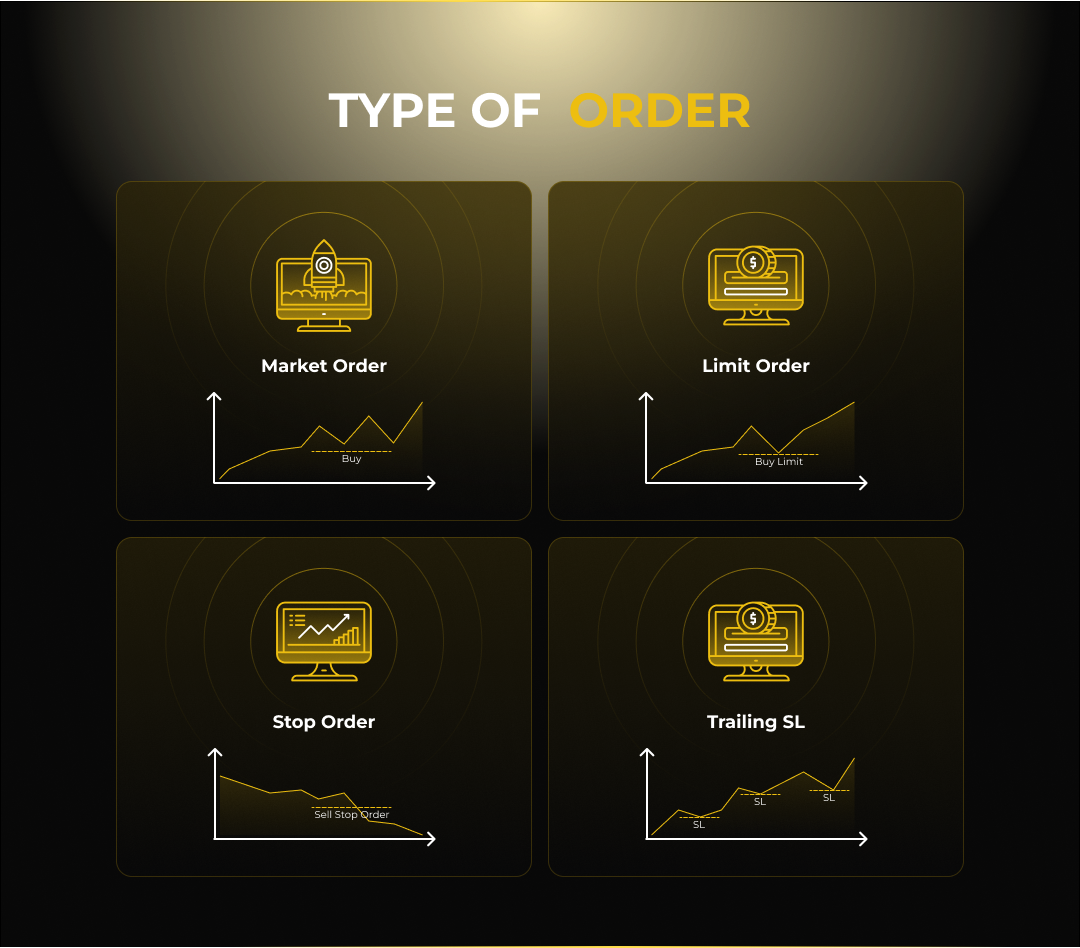
Market Orders – “Get Me In or Out, Now!”
This is the simplest and fastest way to trade.
What It Does:
A market order tells your broker to execute your trade immediately at the best available price in the market right now.
Example:
- EUR/USD is currently showing 1.1050 (Bid) / 1.1052 (Ask)
- You place a market buy order → You’ll get it at or around 1.1052
You place a market sell order → You’ll get it at or around 1.1050
Pros:
- Fast execution – you enter or exit instantly
- Ideal in fast-moving markets when speed matters more than price
Cons:
- No control over exact entry price (possible slippage in volatile conditions)
- Can result in worse-than-expected price during news spikes
When to Use It:
- Breaking news or high volatility moments
- When you must get in/out immediately or spot a real-time opportunity (e.g., stop further losses)
Trader Tip:
Market orders are like saying, “I’ll take the taxi waiting right now, no matter the fare.” Sometimes it’s perfect – other times you’ll wish you waited for a better rate.
Limit Orders – “I’ll Wait for My Price”
A limit order is like fishing – you set the bait (price) and wait for the market to come to you.
What It Does:
You specify the price at which you want to buy or sell. The order will only execute if the market reaches your price or better.
Example: Buy Limit
- You want to buy EUR/USD at 1.1020 (current price is 1.1050)
- You set a buy limit at 1.1020 → The trade will execute only if the price drops there.
Example: Sell Limit
- If EUR/USD is trading at 1.1050, and you believe the price will climb to 1.1080 before falling, you can set a Sell Limit order at 1.1080.
- When the price reaches that level, your sell position opens automatically.
Pros:
- Full control over entry/exit price
- Great for getting in at support/resistance levels
Cons:
- The market might never reach your price – order stays unfilled
- In fast moves, price may touch and bounce away before you’re filled
When to Use It:
- Trading pullbacks into key levels
- Avoiding overpaying in impulsive moves
Trader Tip:
Limit orders are patience-driven. They keep you disciplined and prevent chasing prices – but you need to be okay with sometimes missing a trade.
Stop Orders – “Trigger Me When It’s Time”
Stop orders are a bit like a burglar alarm – you set the trigger point, and when it’s hit, action is taken.
Stop-Market Order
What It Does:
You set a trigger price. Once price reaches it, your order turns into a market order.
Example: But Stop
- You’re buying EUR/USD if it breaks above 1.1100
- You place a buy stop at 1.1100 → When price hits it, a market buy is executed at the next available price
Example for Sell Stop
- You’re selling EUR/USD if it breaks below 1.1000.
- You place a Sell Stop at 1.1000 → When the price drops to that level, a market sell order is triggered at the next available price.
Pros:
- Allows entry into breakout moves
- Automates entries or exits without constant monitoring
Cons:
- No price control once triggered – possible slippage
- In fake breakouts, you may enter only to see price reverse
Stop-Limit Orders – “Trigger Me, But Only on My Terms”
A stop-limit order is the upgrade of a stop order – it combines a trigger price and a limit price.
How It Works:
- You set a trigger price (stop)
- You set a limit price (maximum or minimum you’ll accept)
Once the trigger is hit, the order becomes a limit order instead of a market order.
Example:
- You want to buy if price breaks 1.1100, but only if you can get in at 1.1102 or better
- Trigger = 1.1100, Limit = 1.1102
Pros:
- Avoids bad fills during volatility
- Maintains price discipline
Cons:
- The market could gap past your limit, and your order won’t execute at all
- Can miss trades in fast moves
Trader Tip:
Use stop-limits when you want the best of both worlds—automatic entry, but with protection against nasty fills.
Trailing Stops – “Lock In Profits as the Market Moves”
A trailing stop is your profit-protection buddy. It is a dynamic type of stop order that automatically adjusts as the market moves in your favour. Unlike a regular stop loss that stays fixed, a trailing stop shifts along with the price by a set number of pips or a percentage, helping to secure profits as the trade becomes more favourable. However, if the market reverses by that same predefined distance, the trailing stop activates and closes the position – protecting your earned gains from further loss.
What It Does:
You set a stop loss at a fixed distance from the market price (in pips or %). As price moves in your favor, the stop automatically moves with it.
Example for Buy Trailing Stop:
- You set a trailing stop 50 pips behind the current price
- If the price rises by x pips, your stop loss moves up by x pips, maintaining the requested distance betweenthe market price and the SL level
- If price reverses by 50 pips from the high, you’re taken out with profits locked
Example for Sell Trailing Stop
- You set a trailing stop 50 pips above the current market price.
- If the price drops by X pips, your stop loss automatically moves down by X pips to follow the trend, maintaining the requested distance between the market price and the SL level
- If the price then rises by 50 pips from the most recent low, your trade closes automatically – locking in the profit you gained from the downward move.
Pros:
- Locks in gains automatically
- Keeps you in trends without emotional exits
Cons:
- In choppy markets, trailing stops can trigger too early
- No guarantee of exact exit price in fast moves
These are extra conditions telling the broker how long to keep your order active.
- Day Order: Expires at the end of the trading day
- GTC (Good-Till-Canceled): Stays active until you cancel or broker’s max limit (often 90 days)
- IOC (Immediate-or-Cancel): Fills whatever is available instantly; cancels the rest
- FOK (Fill-or-Kill): Must fill entirely immediately or cancel
- OCO (One-Cancels-the-Other): Two orders placed – if one triggers, the other is cancelled automatically
- OSO (One-Sends-the-Other): One order triggers the placement of another
Quick Reference Table
| Order Type |
Speed |
Price Control |
Best For |
| Market |
Instant |
None |
Urgent entries/exits |
| Limit |
Variable |
High |
Buying low/selling high |
| Stop (Market) |
Triggered |
None after trigger |
Breakouts, automated exits |
| Stop-Limit |
Triggered |
High |
Precise breakout entries |
| Trailing Stop |
Auto-adjust |
Partial |
Protecting profits |
Final Words – Choose the Right Tool for the Job
Trading order types aren’t just “technical details” – they are risk management tools. Using the wrong one for the wrong situation can turn a winning idea into a losing trade.
- Need speed? → Market order.
- Need precision? → Limit order.
- Need automation? → Stop or stop-limit order.
- Need to protect gains? → Trailing stop.
The markets reward preparation, not luck. Mastering these order types will give you the control, flexibility, and discipline to trade like a professional – whether you’re chasing short-term moves or playing the long game.